

Shaded Bench
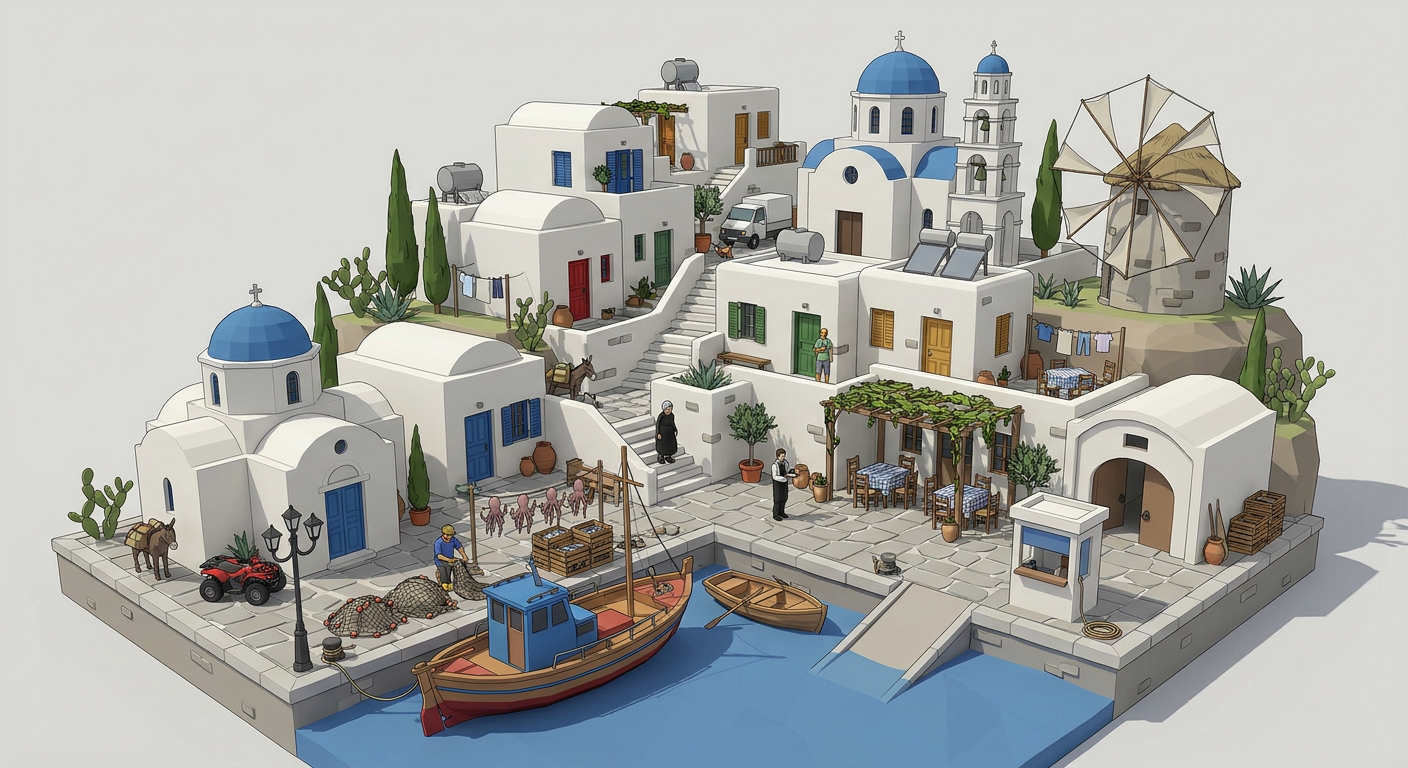 Part of Mediterranean Island Village
42 matching parts, one palette and scale
Part hierarchy (toggle visibility)
Use it
The fastest path in three.js: one import, zero loaders. The module returns a ready THREE.Group with named parts.
import { createAsset } from 'https://polyfork.dev/cdn/shaded-bench-1078c2.mjs';
scene.add(createAsset());
Downloaded it instead? Import
'./shaded-bench-1078c2.mjs' and add the importmap below. The zip
ships a working index.html with both already in place.
Full working example (a complete copy-paste HTML page)
<!doctype html>
<script type="importmap">
{ "imports": { "three": "https://unpkg.com/[email protected]/build/three.module.js",
               "three/addons/": "https://unpkg.com/[email protected]/examples/jsm/" } }
</script>
<script type="module">
import * as THREE from 'three';
import { OrbitControls } from 'three/addons/controls/OrbitControls.js';
import { createAsset } from 'https://polyfork.dev/cdn/shaded-bench-1078c2.mjs';

const scene = new THREE.Scene();
scene.background = new THREE.Color(0xf3ecdc);
// Far plane at 5000: terrain blocks are 64 to 256m across and a 100m
// frustum slices them.
const camera = new THREE.PerspectiveCamera(45, innerWidth / innerHeight, 0.1, 5000);
camera.position.set(3, 2, 4);
const renderer = new THREE.WebGLRenderer({ antialias: true });
renderer.setSize(innerWidth, innerHeight);
document.body.style.margin = 0;
document.body.appendChild(renderer.domElement);
scene.add(new THREE.HemisphereLight(0xffffff, 0x998877, 1.2));
const sun = new THREE.DirectionalLight(0xfff2e0, 2);
sun.position.set(4, 7, 5);
scene.add(sun);

scene.add(createAsset());
new OrbitControls(camera, renderer.domElement);
renderer.setAnimationLoop(() => renderer.render(scene, camera));
</script>
The standard route: load the GLB with GLTFLoader. The same file works in any glTF pipeline (Babylon.js, <model-viewer>, custom engines).
import { GLTFLoader } from 'three/addons/loaders/GLTFLoader.js';

new GLTFLoader().load('https://polyfork.dev/cdn/shaded-bench-1078c2.glb', (gltf) => {
  scene.add(gltf.scene); // real-world scale in meters, origin on the ground
});
Flat-shaded vertex colors on a single material: no textures to wire up, one draw call.
R3F takes any Object3D through <primitive>, and these modules
return a ready THREE.Group synchronously. No useGLTF, no loader, no
<Suspense>.
import { useMemo } from 'react';
import { Canvas } from '@react-three/fiber';
import { createAsset } from './shaded-bench-1078c2.mjs';

function ShadedBench(props) {
  const obj = useMemo(() => createAsset(props), [JSON.stringify(props)]);
  return <primitive object={obj} />;
}

<Canvas camera={{ position: [3, 2, 4] }}>
  <hemisphereLight args={[0xffffff, 0x998877, 1.2]} />
  <directionalLight position={[4, 7, 5]} intensity={2} />
  <ShadedBench colorway="fresh-cane" />
</Canvas>
Every knob is a prop. colorway="fresh-cane" above is one of this
model's own parameters, so the component rebuilds when it changes, exactly like any other React
component. More on using these in R3F.
Open this model in StackBlitz A running R3F project with this model in it, no install.
Self-animating models, and one draw call
A model that animates itself exposes
userData.tick(seconds). Drive it from R3F's own loop:
useFrame((state) => obj.userData.tick?.(state.clock.elapsedTime));
To merge a static set into a single draw call, import
mergeAssets from https://polyfork.dev/cdn/merge.mjs and pass the merged
group to one <primitive>.
- Download the .glb from this page.
- Unity: drag the file into Assets (glTFast or UnityGLTF import it). Godot: drop it into the project, it imports natively. Blender: File → Import → glTF 2.0.
- Place it as-is: real-world scale in meters, origin at ground level.
- Materials arrive as vertex colors on one material: no texture files, nothing to relink.
Using Claude Code, Cursor or another coding agent? This site is built for them: agent-readable docs at /llms.txt and a JSON API at /api. Paste this prompt:
Add the "Shaded Bench" low-poly model from polyfork.dev
to my three.js scene. It is free and hotlinkable, nothing to download:

  ES module: https://polyfork.dev/cdn/shaded-bench-1078c2.mjs
             (import { createAsset } - returns a THREE.Group, real-world scale)
  GLB:       https://polyfork.dev/cdn/shaded-bench-1078c2.glb

Full metadata (size, palette, rigged parts): https://polyfork.dev/api/assets/shaded-bench-1078c2
Site docs for agents: https://polyfork.dev/llms.txt
Every asset in this catalog shares one identical vertex-colored material, with no textures at all. That means whole scenes collapse into a single draw call: the same result Synty-style packs get from a texture atlas, without the atlas.
import { mergeAssets } from 'https://polyfork.dev/cdn/merge.mjs';

// position your assets first, then:
const { merged, dynamic } = mergeAssets([
  terrain, tree, rock,
  asset,
]);
scene.add(merged);                  // ONE draw call, static
dynamic.forEach(d => scene.add(d)); // rigged parts, still movable
Placing many copies of one model? Use THREE.InstancedMesh instead: one draw call and even less memory. The landing page's forest demo ends with exactly this merge.
Share it
Hotlink or download it. The copy-paste snippet just works.
A built limewashed masonry bench, 2.0 x 1.0 m footprint, a rounded seat and backrest, shaded by a light cane-mat roof on two slim timber posts at 2.3 m; whitewash chalks the bench and greys the cane. Part of the Mediterranean Island Village kit.
- 798 triangles · 1 material
- 2.26 × 2.11 × 1.34 m, real-world scale
- GLB (90 KB) + drop-in ES module
- Commercial use: games, apps, client work, anything, no attribution required. The mesh files are also CC BY 4.0: share or resell them with a credit. (No reselling the .mjs source, and no building a commercial asset generator from it.)
Materials, not vertex colours: the palette comes across as named materials you can retint, and they carry this model's own knob names.
Free, no account needed, commercial use included.
The source code, the .mjs program behind the sliders, comes with a
free account, zipped with
the GLB and a ready index.html.
Need a different version of this? Request a variant.
Related assets
 Free
 Free
 Free
 Free
 Free

One of 3,629 free 3D models for three.js, every one hotlinkable from the CDN with no account.